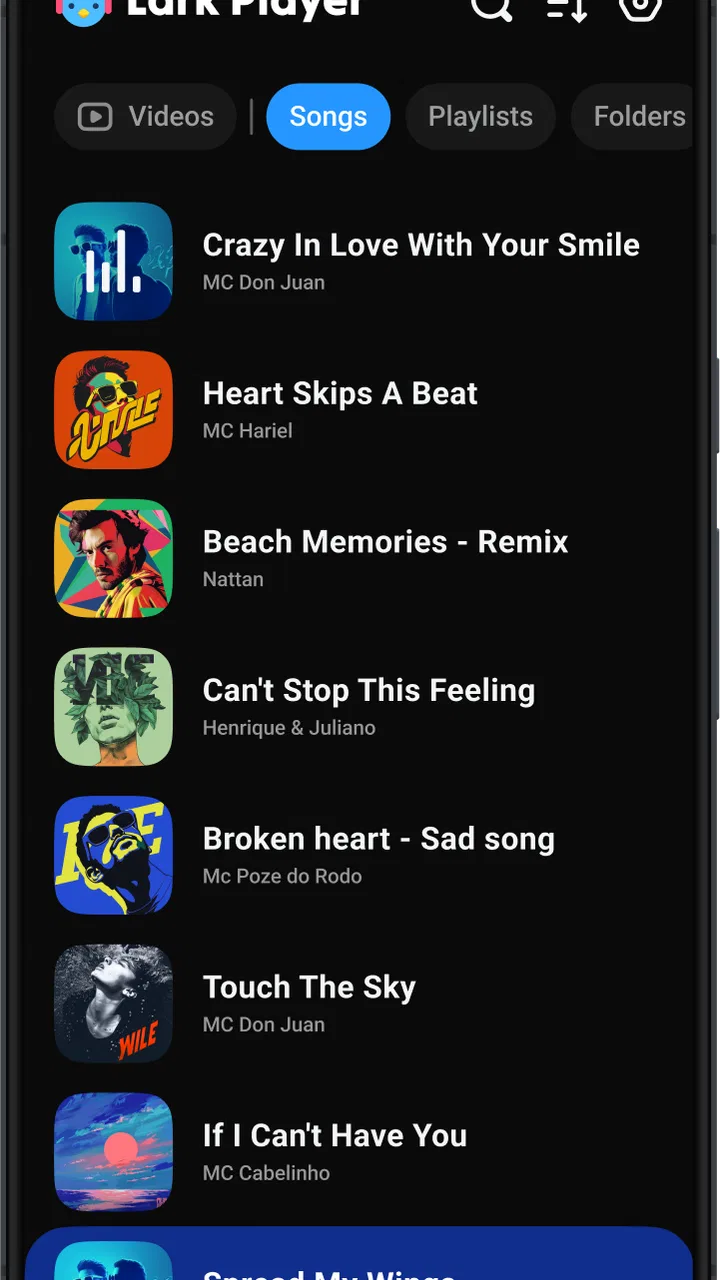
Lark Player:Music Player & MP3
- 4.6
- Rating
- 500.00M
- Installs
- Free
- Price

 Analysis by App-foxy
I usually judge a music player by what happens after the first few minutes of excitement: can I find my files, start listening quickly, control the sound comfortably, and recover when something does not behave as expected? That is the useful way to look at Lark Player:Music Player & MP3. It is a free music and audio app from Lark Player Studio - Music, MP3 & Video Player, aimed at people who want local listening with a more flexible interface than the basic player already installed on a phone.
At first glance, its appeal is straightforward. It brings together offline music playback, themes, an equalizer, lyrics, and different playback modes instead of treating a music library as a simple list of files. That combination makes sense for someone who has downloaded songs, transferred MP3 files, or keeps audio on a device for places with unreliable internet. My experience is that the app is most useful when I treat it as a practical library tool rather than as a replacement for a streaming subscription.
Its scale also explains why many people come across it. The app has a 4.6 average from around 5.1 million ratings and has passed over 500 million installs. Those figures do not guarantee that it will suit every phone or every music collection, but they do suggest that the basic idea is easy for a large audience to understand. The important question is whether its extra controls are worth the occasional setup work.
In-Depth Coverage of Lark Player:Music Player & MP3
Where the first listening session can get stuck
The most common point of friction is not pressing play. It is getting the library to look the way I expect. A local player depends on the files being visible to the device and organized in a way the app can interpret. If songs are scattered across folders, have incomplete tags, or were copied recently, the first library view may feel less tidy than expected.
I recommend giving the initial scan a moment before assuming that tracks are missing. If a song still does not appear, I check whether it is actually stored on the phone, whether the file opens elsewhere, and whether its format is something the device can read. This simple sequence is more useful than repeatedly tapping refresh. A player cannot display a file that the operating system or storage location does not expose correctly.
Another small surprise is that an offline player is not the same thing as an automatic music downloader. Lark Player is designed to play audio already available on the device. If I expect it to build a complete catalog from an online account, I am starting with the wrong expectation. For personal MP3 collections, that distinction is clear; for people who want instant access to a huge streaming catalog, a dedicated streaming service will usually be a better match.
Lyrics can also create confusion. The presence of a lyrics function does not mean every locally stored track will automatically have perfectly matched words. Files may have different spellings, versions, or missing information. I treat lyrics as a useful extra when they appear correctly, not as the main reason to choose the app. When the text does not match, I first check the song title and artist information rather than blaming playback.
The same practical thinking applies to themes and sound controls. A theme changes the feel of the interface, while an equalizer changes how the audio is presented. Neither one repairs a poor recording or a damaged file. I get better results by making small sound adjustments and comparing them with the original setting, especially with headphones where excessive bass or treble can become tiring quickly.
What I check before changing settings
Before troubleshooting, I confirm that the phone is not muted, that the media volume is raised, and that audio is not being sent to a disconnected Bluetooth device. These checks sound obvious, but they explain many “the player is broken” moments. I also test another track. If one file fails while others play, the issue is more likely connected to that file than to the whole app.
I keep the first session simple: locate one known song, play it, pause it, skip forward, and test the lock-screen or notification controls available on my device. Only after that do I explore themes, lyrics, and the equalizer. This order separates basic playback from optional customization and makes it much easier to identify the actual source of a problem.
Because the app is free, it is easy to install casually and then expect everything to be ready immediately. In practice, a little organization pays off. I prefer folders with clear names and consistent artist and album information. That makes browsing more pleasant and reduces the chance that several versions of the same song look identical in the library.
The app is rated for Everyone, which fits its straightforward music-player purpose. It is also free to install, with in-app purchases listed from $0.99 to $6.99 per item. I would not install it assuming that every optional element will behave exactly like the basic playback experience. The sensible approach is to use the core player first and decide later whether any additional purchase is worthwhile for my own routine.
Setup checks that prevent most avoidable problems
My recommended setup starts with the music itself. I make sure the files are stored locally, play one or two of them in another player, and remove obvious duplicates if the collection is confusing. Then I open Lark Player and look for the tracks. This creates a useful baseline: if the files already work elsewhere, any later issue is probably related to library presentation or app settings rather than the audio files themselves.
I also avoid changing several things at once. If I activate a new theme, alter the equalizer, and switch playback modes in the same session, I lose track of what changed. Instead, I test one option, listen for a minute, and keep it only if it improves the experience. This is especially helpful with equalizer presets, because a setting that sounds exciting for one genre may make spoken audio or quieter recordings uncomfortable.
For lyrics, I inspect the track information before trying again. A title with extra symbols, a remix label, or a missing artist name can make matching less reliable. Renaming files consistently is a surprisingly effective improvement. It is not glamorous, but it helps both human browsing and any matching process that depends on track details.
You May Also Like

 Blood Strike: 2.5 Anniversary
Blood Strike’s Loadouts Turn Every Drop Into a Tactical Gamble
A close look at Blood Strike’s custom loadouts: how fast access to signature weapons reshapes its battle royale rhythm, rewards preparation, and narrows the gap between fights.

 Pandora - Music & Podcasts
Pandora’s Music Is Easy to Start, but Harder to Recover
Pandora’s strength is its low-effort path from a seed to a station. Its weak spot is how much confidence it asks you to place in connection, setup, and quiet recovery.

 8 Ball Pool
8 Ball Pool Is Built on Rivalries, Rematches, and Routine
A close look at the rivalries, rematches, shared routines, and unanswered safety questions that turn a quick pool match into a persistent mobile community.

 Samsung Music
Samsung Music’s Quiet Strength Is Playing What You Already Own
Its reach comes less from spectacle than from dependable access to a personal library. That simplicity is both the app’s strongest retention engine and its ceiling.

 AccuWeather: Weather Radar
AccuWeather Review: A Quick, Clear Forecast for Everyday Decisions
For everyday plans, the best forecast is the one you can understand quickly. AccuWeather makes rain timing, radar, and local conditions easy to act on, with a few trade-offs.

 Hill Climb Racing
Why Hill Climb Racing Still Turns Crashes Into One More Run
A tiny car, a bumpy hill and one more upgrade: Hill Climb Racing keeps resurfacing because its simple chaos makes every near-miss feel personal.
More From Our News Desk



Playback modes deserve a deliberate check too. I test whether I want a single song to repeat, an album to continue in order, or a broader collection to play without interruption. When a track seems to start again unexpectedly, the first thing I inspect is the selected mode. That is faster than assuming the app has duplicated the song or damaged the queue.
One useful habit is to keep a short “known good” group of songs. I use a few files that have always played correctly to test changes after an update, a device restart, or a sound adjustment. If those tracks work, I know the basic playback path is healthy and can focus on the particular file or collection that is causing trouble.
Making the interface work for a real routine
The best setup depends on how I listen. For commuting, I favor a small offline collection and a playback mode that does not require constant screen interaction. For focused work, I use a predictable album or playlist-like sequence rather than repeatedly searching by artist. For casual listening at home, themes and the equalizer matter more because I have time to experiment.
This is where the app feels more capable than a very basic file player. The combination of visual customization, sound adjustment, lyrics, and playback choices gives me more control over the listening session. However, those controls also mean more decisions. Someone who wants one large play button and nothing else may find the extra options unnecessary rather than helpful.
I would also avoid judging audio quality solely by the equalizer. If a recording sounds harsh, quiet, or distorted, I compare it with the same file in another player and with the equalizer turned off. If the problem remains, changing sliders will probably only disguise it. A good local player can present a file well, but it cannot restore detail that was never in the recording.
Recovering a workflow when playback or the library misbehaves
When a song disappears after I add new files, I do not immediately rebuild the entire collection. I first close and reopen the app, then check the file location and its visibility in the phone’s file manager. If only newly added tracks are affected, I focus on scanning or indexing rather than changing unrelated sound settings. This keeps the recovery process controlled.
If playback stops, I test a different song and then test the original file outside the app. I check the output route as well: Bluetooth speakers, wired headphones, and the phone speaker can each create the impression that playback has failed. Once I know whether the issue follows the file or the output device, the next step becomes much clearer.
A useful recovery pattern is to return temporarily to simple settings. I turn off unusual equalizer changes, select a normal sequential playback mode, and test one familiar track. If that works, I reintroduce customization one option at a time. This is not a dramatic fix, but it avoids the common mistake of adding more changes while trying to remove a problem.
For a disorganized library, I repair the collection outside the player when possible. I use consistent filenames, separate unrelated audio, and remove duplicates before asking the app to display everything again. That approach is slower than pressing a button, but it produces a cleaner result and helps any local music player, not only this one.
Lyrics require a separate recovery path. If the words are absent or mismatched, I verify the track identity, check the spelling, and compare another version of the same song. I do not treat a lyrics problem as evidence that the audio engine is failing. Keeping those functions conceptually separate saves time and prevents unnecessary reinstallation.
Reinstalling is something I reserve for the end, because it can disrupt a carefully arranged local workflow. Before taking that step, I make sure I know where my music files are and that I can access them independently. The app is a player, not the only copy of the collection, so protecting the files matters more than preserving a particular library view.
When the app is not the cause
Many listening problems begin outside the player. A damaged MP3, an incomplete transfer, a storage issue, or a phone-wide audio problem can look exactly like an app failure. My quickest test is comparison: try the same file in another player, then try a different file in Lark Player. The results usually point toward the file, the device, or the app.
Bluetooth adds another layer. A phone may remain connected to a speaker in another room, or the speaker may have switched to a different input. If the progress bar moves but I hear nothing, I inspect the output connection before touching the equalizer. If the sound is delayed or interrupted only through Bluetooth, I compare it with the phone’s own speaker or wired output.
Storage and file organization can create similar confusion. Moving a folder, renaming a file, or removing a memory card can leave a library view that no longer reflects the current location. I check the actual path and open the file directly. This is particularly important for people who transfer music between phones or keep part of their collection on removable storage.
There is also a difference between a player problem and a content problem. A low-quality recording, an unusually quiet master, or a file with incorrect metadata may behave normally while still being unpleasant to use. The equalizer can help with personal preference, but it should not be used to cover every defect. Sometimes replacing the file is the cleanest solution.
Compared with streaming services, Lark Player gives me more direct control over music I already own or have stored locally, and it does not depend on a continuous connection for ordinary offline playback. Streaming apps are usually better for discovery, synchronized libraries, and effortless access across devices. Compared with a minimal built-in player, Lark Player offers more ways to shape the listening experience, but the interface may require more attention.
I would skip it if my main goal is discovering unfamiliar artists through a subscription catalog, keeping playlists synchronized between several devices, or avoiding all file management. I would also look elsewhere if I strongly prefer a completely stripped-down interface. On the other hand, it is a sensible choice for someone with a personal MP3 collection who wants themes, lyrics, sound controls, and playback flexibility in one place.
A practical verdict for everyday listening
A realistic example is a train journey where I have saved a collection of albums on my phone. Before leaving, I test a few tracks, choose a comfortable playback mode, and adjust the equalizer with headphones rather than during the trip. If one album does not appear, I check its folder and metadata at home instead of rebuilding the whole library on the platform. That small preparation makes the app feel dependable because I am using its strengths deliberately.
I also like that the app can serve different listening moods without forcing the same setup every time. A theme can make the interface easier on my eyes, lyrics can be useful when I want to follow a song, and playback controls can reduce the need to search manually. These are practical additions, not reasons to ignore the basics. The cleaner the local collection, the more valuable the app’s extras become.
My main reservation is that convenience depends on expectations. The app does not remove the work involved in maintaining local music, and its richer controls can make a simple task feel busier. New users should resist changing everything immediately. Start with one reliable file, confirm sound output, organize the library, and then explore the optional tools.
For a free music and audio app, the balance is appealing. The developer, Lark Player Studio - Music, MP3 & Video Player, has built something aimed at everyday offline listening rather than at one narrow audiophile workflow. The Everyone age rating makes it approachable, while the optional in-app purchases mean I would review any extra purchase on its own merits instead of assuming it is necessary for basic playback.
My final recommendation is positive, with a clear condition: choose it when your music is already on your device and you want more control than a barebones player provides. I would not choose it as my primary discovery service or as a zero-maintenance cloud library. For local MP3 listening, though, Lark Player:Music Player & MP3 combines useful customization with a familiar purpose. The smartest way to use it is to fix the music collection first, then let the app handle the listening.
FAQs for Lark Player:Music Player & MP3
01What features does Lark Player offer for music playback?
Lark Player is a versatile music player that supports a wide range of audio formats, including MP3, WAV, and AAC. It offers features like an equalizer, lyrics display, and customizable themes. Users can create playlists, use a floating music player, and enjoy offline playback. Its intuitive interface makes navigating these features seamless.
02Is Lark Player free to use, and are there any in-app purchases?
Lark Player is free to download and use, providing access to its core features without charge. However, it does offer in-app purchases for advanced options and an ad-free experience. Users can choose to upgrade to enhance their listening experience if they prefer a premium service.
03Does Lark Player support offline music playback?
Yes, Lark Player supports offline music playback. You can play songs stored directly on your device without needing an internet connection. This feature is particularly useful for users who want to enjoy their music on the go or in areas with limited connectivity.
04Can Lark Player sync with streaming services?
As of now, Lark Player primarily focuses on playing locally stored music and does not directly sync with streaming services like Spotify or Apple Music. However, it excels at providing a rich listening experience for files already downloaded to your device.
05What kind of user interface does Lark Player have?
Lark Player boasts a user-friendly and visually appealing interface. It offers customizable themes, making it easy for users to personalize their experience. The layout is intuitive, allowing for easy navigation between playlists, albums, and the equalizer settings, ensuring a smooth user experience.
Pros
- User-friendly interface and easy navigation.
- Supports a wide range of audio formats.
- Customizable equalizer settings.
- Offline music playback capability.
- Minimal ads for a free app.
Cons
- Lacks advanced audio editing features.
- No option for cloud storage integration.
- Limited music discovery options.
- Occasional app crashes reported.
- Playlist management can be cumbersome.

Lark Player:Music Player & MP3
Gallery